
Workshop Architecture
Welcome to the architecture section of the workshop. This is where we will go over the use cases for the labs.
But first let's introduce you to a new customer.

Customer imnotbiased.com
Imnotbiased.com is a very successful business that deals exclusively with Tyrannosaurs Rex merchandise.
Operating since 2016 they have gone from selling plush toys to launching a set of mini figures which are sought after globally. Some of these have sold aftermarket for very lucrative amounts!
They are mostly in AWS cloud as their chosen hosting platform and have been using Splunk for the past 3 years.
After meeting with a very proficient Splunk partner they decided to optimise their current architecture to use the Cisco Data Fabric powered by Splunk.
The partner proposed the architecture described below:
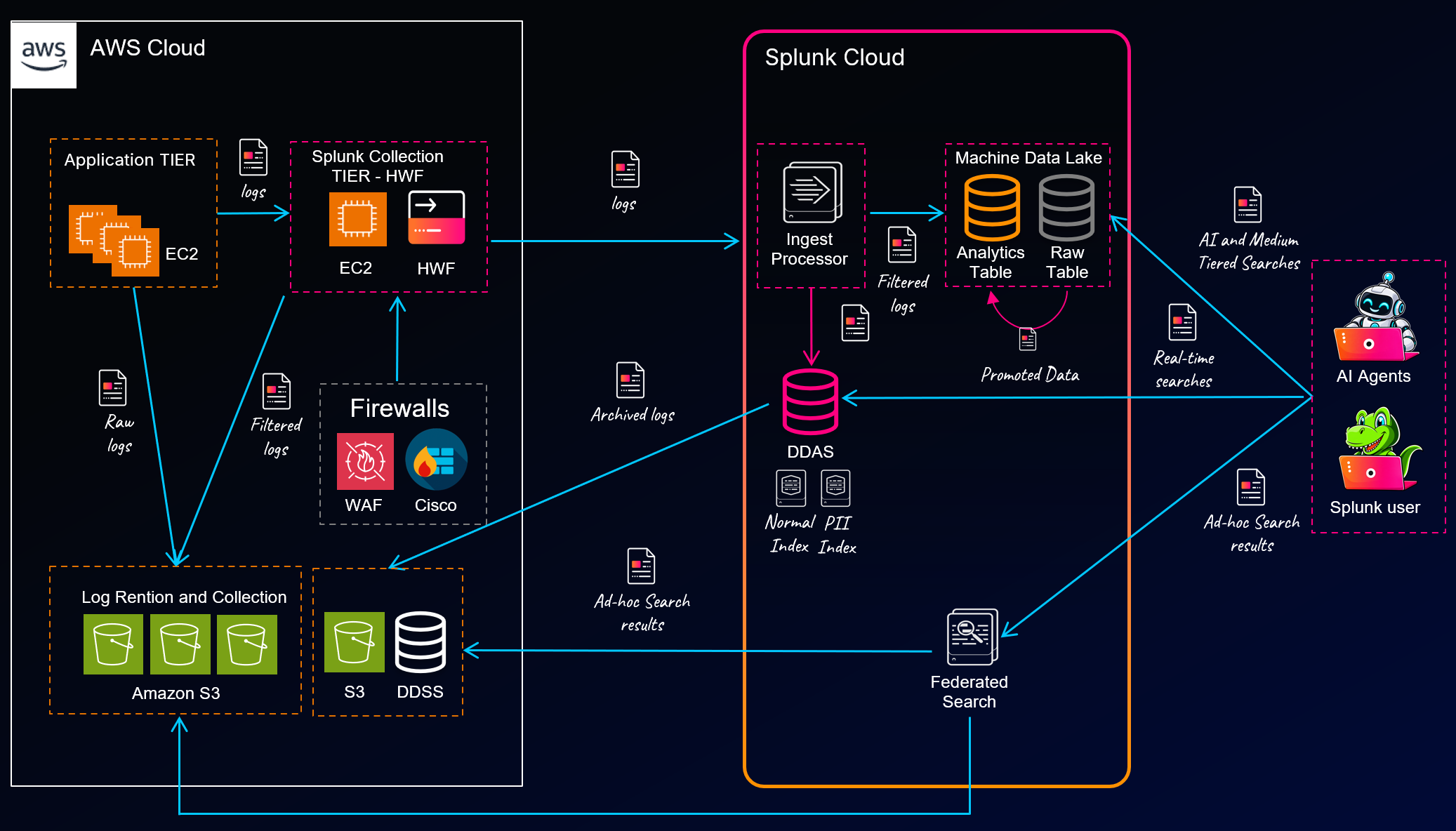
In this workshop you are going to help the imnotbiased.com team implement some of this architecture. Let's look at what's in store.
Lab 1: Credit Card Transactions
The imnotbiased.com team has a challenge where credit card transaction details are coming into a single index in Splunk. Currently that data is needed by two different teams. The infrastructure monitoring (IM) team and the pii audit/archive team. The challenge is the IM team has access currently to the raw data which is classified as personable identifiable information (pii) data. This is not great and a risk. So...
Lab 1 will use Splunk's powerful ingest processor to clone the data into two indexes. One will be the raw original data for the PII team. Then the second index will house just a set of filtered and redacted data which the IM team need.
Lab 2: Routing and Manipulating Cisco Firewall Logs
Although Cisco firewall logs are much cheaper to ingest into Splunk than normal firewall logs, thanks to a great discount you get on certain types, the team would still like to route an original copy of the logs to long term archive in Amazon S3. On top of this the team feel they could optimise the logs to reduce the size of them store in Splunk.
This lab will show you how you can configure Splunk's data management tools to route data coming into the platform to Amazon S3 and then using Ingest processor again we will optimise the logs before they get stored inside of Splunk for analysis.
Lab 3: Using Splunk's Federated Search for Amazon S3 platform to analyse logs
The team at imnotbiased.com has a heap of logs that are sitting in Amazon S3 which they haven't been able to easily analyse before. These include CloudFront access logs, AWS WAF logs and VPC Flow logs.
In this lab we will show you how to configure the Federated Search for Amazon S3 service to search logs in different methods and formats.
Lab 4: Machine Data Lake searching and promotion
Not all data is equal. A bunch of web access logs are coming into the Splunk platform and the team does not want to store these in the speedy Splunk dynamic data active search (DDAS) tier. They heard about Splunk's new Machine Data lake which is a super low cost storage capability which allows you to dump data in, search it then when/if you choose, promote it to a more performant tier like Analytics table or DDAS.
In this lab we will route some data from DDAS to Machine Datalake Raw table. Once there we will search it and then run a promotion of some of it back into DDAS showing the flexibility of the platform.
Lab 5: Linux Secure logs routing
The team wants to find a new home for the access_combined logs. They aren't being searched very much but the audit team thinks they are a potential future AI agent training data source.
Splunk's Machine data lake might be a better home for these logs than DDAS.
In this lab we will show you a different way we can route data to Machine Data lake.
Lab 6: Configuring Federated Search for DDSS
Lastly, imnotbiased.com team are using Dynamic Data Active Archive (DDAA) to archive some of their data once is prove not useful anymore. This is quite an expensive option as they haven't had to restore in a long time. The Splunk partner recommended to switch DDAA to Dynamic Data Self Storage (DDSS) solution, which allows you to bring your own Amazon S3 bucket and use that as an archive solution. Initially the team was worried about how difficult it might be to restore this if they ever needed too but with the power of the Cisco Data Fabric you can now search the DDSS data using federated search.
In this lab we will show you how to configure a DDSS archive on your own S3 bucket then how you can configure Federated Search to search that data.
##
That's it! Quite a lot hey. Well, let's get started.